Why collocations helped me speak English faster
I used to struggle with English. Not my cup of tea. I performed pretty well in school and in high school, but English was always my kryptonite.
I worked at Inditex for 4 years and I didn’t need any language other than Spanish. That’s when I started consuming English content, but not too much. I used subtitles every single time; otherwise, I didn’t understand anything.
I changed my mindset a few years ago when I applied to The Exponential Fellowship to get a visa to work in Silicon Valley. I read the manifesto and skipped the part about having a “good English level.” I thought language wouldn’t be a real problem and that I’d learn it fast. I was close to being selected by a startup, but when they tried to interview me in English, it was impossible. I was automatically rejected, obviously.
Fast forward to today, my English level is better. I’m writing this post without translation tools or ChatGPT. I feel better learning English. Now it makes sense to me. I’m not learning English for the sake of it. I’m learning English because when you learn this language, thousands of doors instantly open for you: new jobs, new media, new content, new interesting people you can follow.
Why collocations
With that interview rejection, I truly understood the importance of English, especially in tech, so I took action. I started attending conversation classes, consuming more English content, and watching films and TV series without subtitles. It was pretty hard. I’m a learner, and I always want to learn new things, but languages aren’t easy for me.
There are a lot of apps out there for most of those things. I tried Duolingo, where I achieved a 100 days streak. However, I was missing something.
A collocation is a group of words that are commonly used together. For example:
- “Leave a comment”
- “Ask for feedback”
Keeping those collocations in mind has helped me a lot compose better and faster sentences. Also, my sentences stopped sounding like translations from Spanish. I’ve collected many of them over the past few months, and now I’ve published them all at collocations.juan.md.
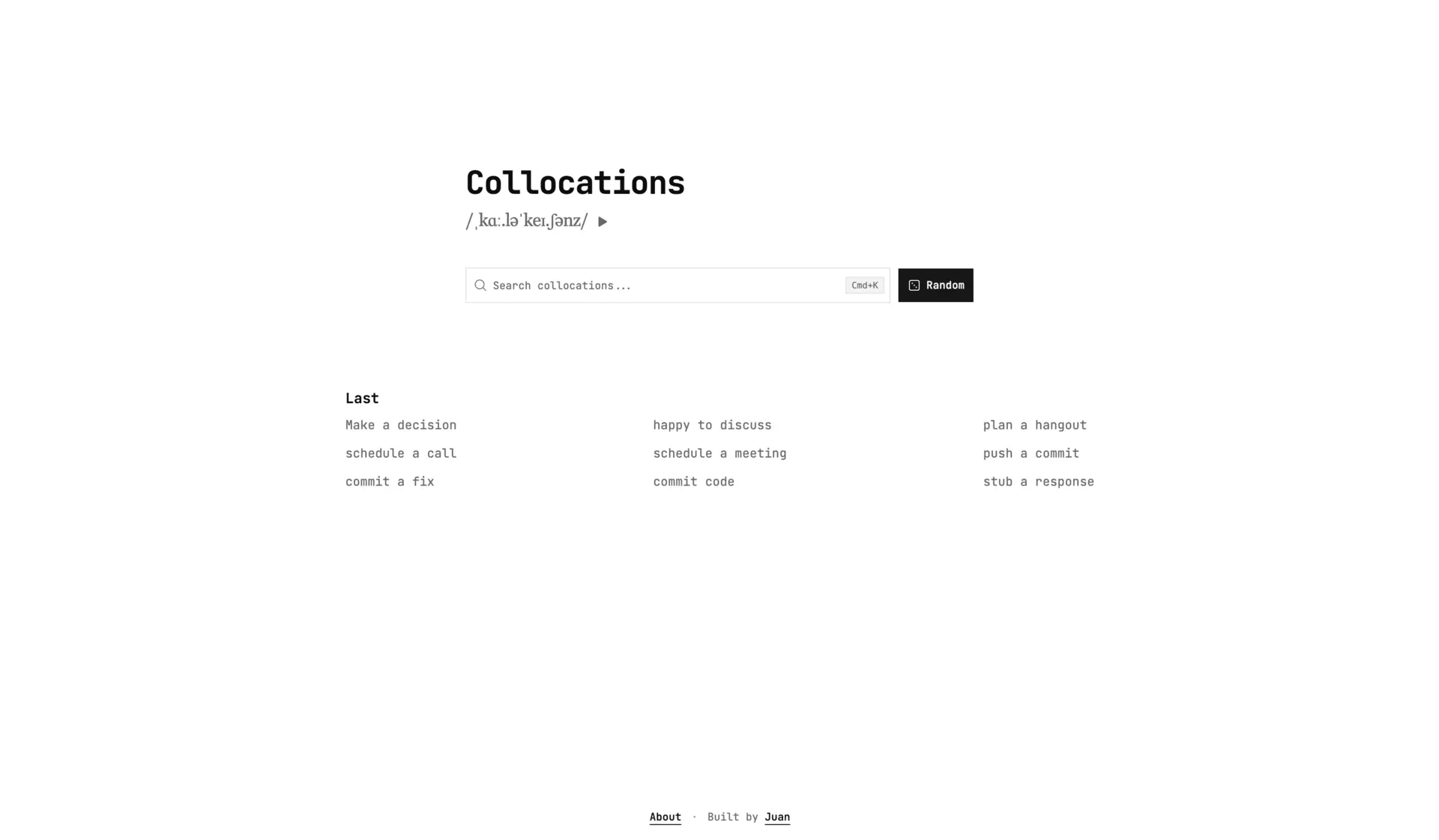
My idea with this project (and all my side projects) was to learn new things about web development. And the idea of this post is to document all the decisions I made. So, let’s get started.
Create a new brand or support my personal brand?
I usually buy a new domain each time I start a side project. It feels like things are getting serious when you buy a new domain.
This time was different. I chose to use my domain juan.md and create a new subdomain. The idea behind this decision is to group all my projects under a single identity.
You can see similar examples with:
- Shadcn UI: https://ui.shadcn.com
- Sonner: https://sonner.emilkowal.ski (I love this domain)
- Vaul: https://vaul.emilkowal.ski
- Cobe: https://cobe.vercel.app (in this case, it strengthens Vercel)
The idea was also to maintain the style and components for this website. I decided to keep each site in its own repository:
They share the same visual direction while remaining independent to develop and deploy.
Building the site
Let’s start with how I built the site. As you can see, it’s a simple website that I developed using Astro.
Why astro? Well, I tried a lot of web frameworks in the last years. I used to pick Next.JS to create webs with server side rendering, but things changed when I started to use Astro. Things make more sense to me with Astro. It’s fully oriented to Server Side Generation, but you can also add “islands” of dynamic content using your favorite frameworks or library, in my case, React. In this case, the collocations pages is fully generated on build, so Astro fit good to me.
It contains 3 main kinds of pages:
- Home
- Collocation page
- Newsletter (I’ll cover this later in the article)
The homepage is a basic page with a collocations searcher (that appears on almost all pages) and a grid with the last 9 collocations. My idea is to keep adding new collocations to this repository over time.
Style and design
I used the same UI as www.juan.md. Both projects keep local copies of the small set of primitives they need, so each one can evolve independently. Basically, my whole design system is based on Tailwind and Shadcn, with a custom theme I generated using the Shadcn creator mode.
Content
My first idea was to save the collocations data in a JSON file in the repository, but this wouldn’t be compatible with the future newsletter I was thinking about.
So I started a project on Supabase and created a collocations database. I maintain a JSON file with some collocation examples for DEV mode, but the production build fetches collocations from Supabase.
It would be great to automatically roll out the app every time I add a new collocation to the table, maybe using a webhook. Adding it to my to-do list…
Random feature
Building the newsletter
The second important feature of this little project is the newsletter. The idea is to send a daily email with an English collocation and examples of how to use it at work.
Collecting the emails
To collect emails, I added a small form with an email field and a job position selector. The idea is to generate custom examples according to your role: SWE, product manager, product designer, or C-level.
This form is protected by Cloudflare Turnstile, a free alternative to Google reCAPTCHA.
The emails are saved in Resend, and I divide the audience by topics. Each job position (SWE, PM, PD, C-level) is a different topic in Resend.
Email template
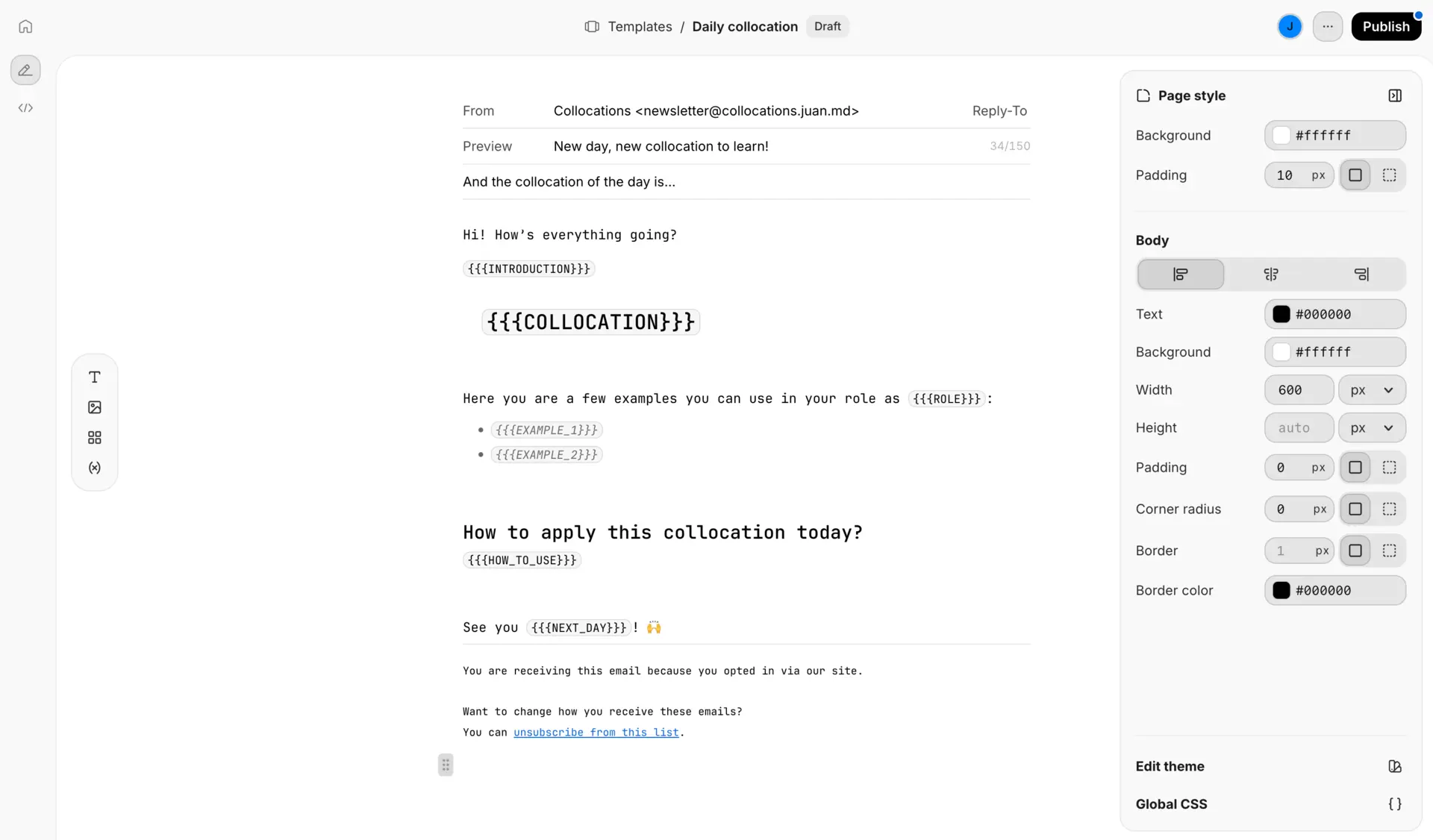
To keep the same style in every email, I created an email template using the Templates feature in Resend.
Generating the emails
I curate the collocations and use AI to draft role-specific examples. Every weekday at 18:00, a Supabase Edge Function runs with the following instructions:
- Get an unused collocation (this is important to avoid sending duplicate emails over time).
- Generate the content for the Resend template variables using the Vercel AI SDK and GPT 5.4.
- Send me an email with the draft.
- Schedule the email for each topic for the next day at 10 AM.
- Persist the used collocation in the Supabase DB to avoid it being used again.
Keep growing
This project helped me rediscover why I do this. Thinks like this are solutions to my own problems. Builders have an incredible superpower: the ability to create solutions that scale. That’s one of the things I enjoy most about my job.
I have a lot of ideas in mind and many problems I want to solve. I’m excited about what’s coming next.
Thanks for reading!